
Review Tools
TradeZella review: journal, pricing and replay
TradeZella is a trading journal for importing trades, adding notes and analysing performance, with backtesting, Trade Replay and Zella AI tools depending on the plan. Support depends on the broker, import route and instrument; Essential, Pro and Ultra have different account and usage limits.

TradeZella
At a glance
- Essential: monthly billing
- 35 USD/month
- Essential: annual payment upfront
- 315 USD/year
- Pro: monthly billing
- 59 USD/month
- Pro: annual payment upfront
- 531 USD/year
A trading journal records and analyses trades. Historical data and practice results do not guarantee trading results.
About the service
TradeZella is subscription software for traders (trade journal); it is not a broker and holds no funds.
TradeZella homepage
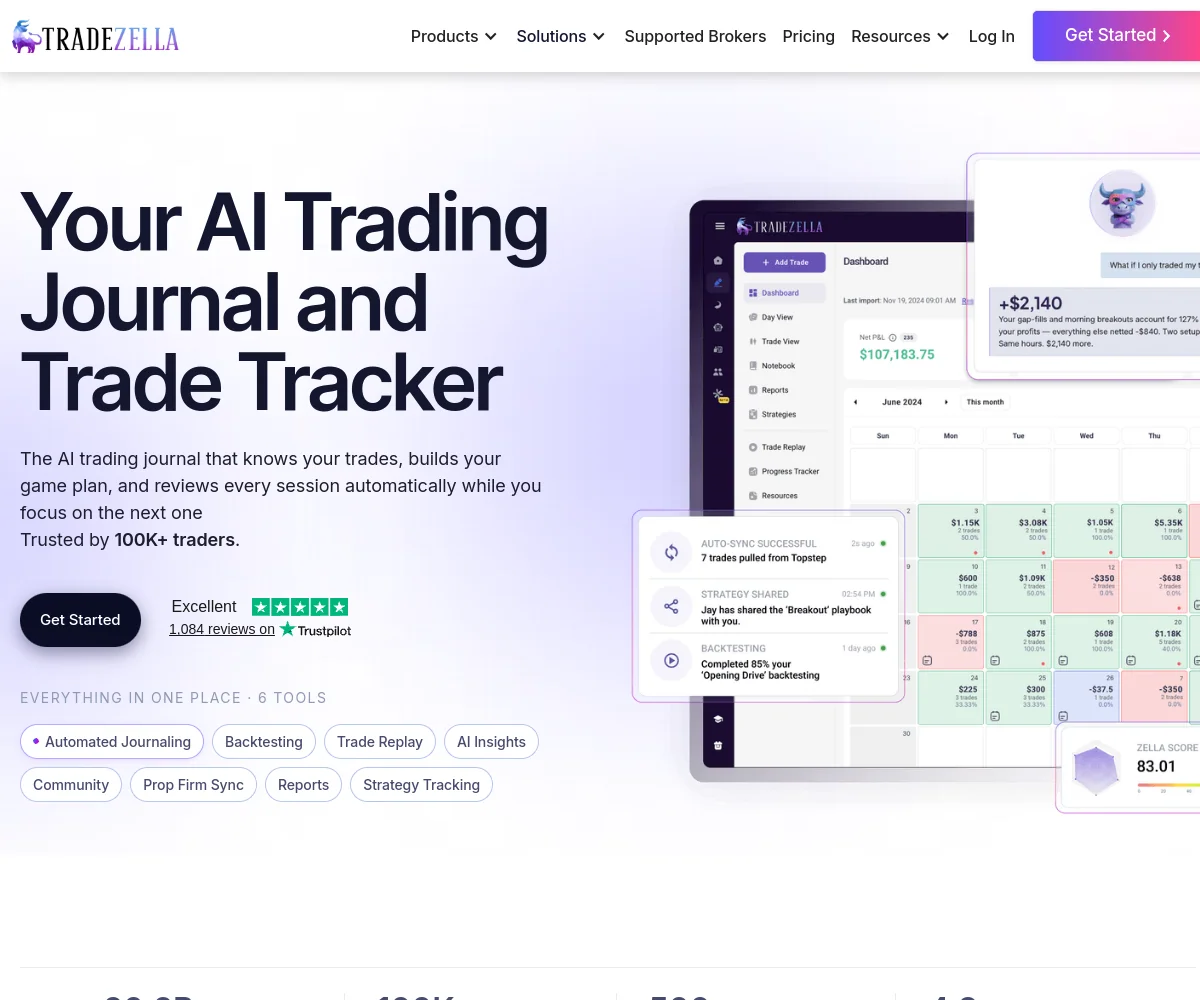
Products and plans
TradeZella trading journal and performance analysis
Fit for your needs
Who it suits
- Who it suits
- Analysing several accounts
Who may prefer an alternative
- Less suited to occasional records
Costs and service terms
- Essential: monthly billing
- 35 USD/month
- Essential: annual payment upfront
- 315 USD/year
- Pro: monthly billing
- 59 USD/month
- Pro: annual payment upfront
- 531 USD/year
- Ultra: monthly billing
- 99 USD/month
- Ultra: annual payment upfront
- 891 USD/year
- Essential: active accounts
- 1 accounts
- Pro: active accounts
- 50 accounts
- Ultra: active accounts
- No stated cap
- Strategies to test
- Essential: up to 10; Pro and Ultra: no stated cap.
- Manual backtesting sessions
- No stated session cap across the three plans.
- Essential: monthly AI credits
- 500 credits/month
- Pro: monthly AI credits
- 1,500 credits/month
- Ultra: monthly AI credits
- 3,000 credits/month
- Pro: monthly automated backtests
- 10 runs/month
- Ultra: monthly automated backtests
- 100 runs/month
- AI Agent scope
- Included in Pro and Ultra; not included in Essential.
- Import methods
- Supported sync, file upload and manual entry.
- Automatic sync interval
- 3 hours
- Manual refresh interval
- 15 minutes
- Assets for journaling
- Stocks, options, forex, crypto and futures.
- Trade Replay
- Pro and Ultra list replays without a stated cap.
- Symbols in a manual session
- 5 symbols/session
- Analysis metrics
- Profit and loss, win rate, profit factor, expectancy and drawdown.
- PropFirm Sync
- Financial tracking and account status, separate from importing trades.
- Two-factor authentication
- Optional authenticator app for email-and-password accounts.
- Subscription cancellation
- Cancel renewal through Subscription; access continues to the billing cycle end.
- Refund policy
- Generally non-refundable, subject to law and exceptions in the terms.
- Privacy and data sharing
- The company says it does not sell personal information for money; sharing and processing still occur.
Products, platforms and terms
- Service type
- Trading journal and performance analysis, with practice on historical data.
Platforms
- Web browser
Advantages and drawbacks
Advantages
- Multiple import routes
- Journaling alongside analysis
Drawbacks
- Essential limitation
- AI allowances
Tools for other needs
These tools serve other parts of the workflow. Choose according to the task you still need to cover.
ATAS · review
Volume and order flow
ATAS displays volume, footprint charts and the order book. Live analysis requires an entitled data-provider or broker connection. A supported trading account is needed when placing live orders.
Bookmap · review
Order book and liquidity
Bookmap displays resting liquidity and executed trades over time. Real-time stock and futures data adds to the software price.
Coinrule · review
Trading rules and automation
Coinrule runs rules that turn conditions into orders in a connected account. Test the trigger, quantity and execution count in demo before enabling live trading.
CoinTracking · review
Crypto records and reports
CoinTracking consolidates crypto history for portfolio views and reporting. Check transfers, cost basis and duplicates before using a calculated report.
Koinly · review
Crypto records and tax reports
Koinly aggregates crypto data for reconciliation and report exports. Tax-year settings, acquisition history and duplicates affect the material passed to an accountant.
TradersPost · review
Order routing and automation
TradersPost routes signals into orders in a connected broker or exchange account. Signals, quantities and accounts need to match, with rejected or duplicate orders monitored.
Read the review · TradersPostVisit TradersPost · Opens in a new tabCoupon: 20% off the subscriptionTraderSync · review
Trading journal and analysis
TraderSync brings trades, notes and reports into a trading journal. Accurate price, quantity and fee imports underpin analysis and practice.
TradingView · review
Charts and alerts
TradingView provides charts, alerts and Pine scripts. Software subscriptions and exchange data are separate components; trading accounts are held with connected brokers.








How to sign up with TradeZella
- Check which import method is supported for your broker: direct sync or a CSV file.
- Set up a journal using the official instructions, import a few trades and check that prices, quantities and fees were recorded correctly.
- Choose a plan for the reports and practice tools you need, and check the subscription price, renewal and cancellation terms before paying.
Tools: guides and key terms
TradeZella
Check the current terms before signing up or paying.
Detailed review
What TradeZella gives a trader
TradeZella brings together trade history, notes, reports and practice on historical data. Its purpose is to connect a financial result with the decisions behind it: the market conditions at entry, whether you followed your plan and what happened afterward. It is particularly relevant to traders who already trade and want a consistent routine for reviewing their work.
The subscription buys software. Actual trades are executed with your broker or trading platform and their records are transferred to the journal. A trade log, simulation or AI answer does not establish that a trade is worthwhile, and none guarantees improved profitability. Connecting an account to a journal also does not determine whether you qualify to open that account.
Using the journal during a trading day
You can begin with a supported broker connection, a file upload or manual entry. After importing, review the trades, add notes and tags, and connect executions to a strategy. This lets you revisit a winning trade that broke your rules as well as a losing trade that followed them.
A useful routine is to check the data first, review a few trades that deserve attention, and then look for recurring patterns in reports. Net profit without checking commissions, timestamps and trade classification can be misleading. The journal organises the material; choosing useful questions and acting on the findings still requires work from the trader.
Pricing: monthly versus annual billing
The three plans are Essential, Pro and Ultra. These prices are in US dollars, with the billing periods kept separate:
Scroll the table horizontally to read every column.
| Plan | Monthly billing | Annual payment upfront |
|---|---|---|
| Essential | $35 per month | $315 per year |
| Pro | $59 per month | $531 per year |
| Ultra | $99 per month | $891 per year |
The annual amount pays for a year, even when the website places a calculated, rounded monthly equivalent next to it. The smaller figure on an annual card is not a plan paid month by month. Check the billing period, applicable taxes and final total at checkout before committing.
For someone still establishing a journaling habit, the annual commitment matters in its own right. The monthly price also tells only part of the story: active account counts, replay use and AI consumption may matter more when choosing a plan.
Essential, Pro and Ultra differences
Scroll the table horizontally to read every column.
| Feature | Essential | Pro | Ultra |
|---|---|---|---|
| Active accounts | 1 | Up to 50 | No stated cap |
| Strategies to test | Up to 10 | No stated cap | No stated cap |
| Manual backtesting sessions | No stated cap | No stated cap | No stated cap |
| Monthly AI credits | 500 | 1,500 | 3,000 |
| AI Agents | Not included | Included | Included |
| Trade Replay | Company descriptions conflict | No stated cap | No stated cap |
Essential is aimed at one active account and recording and analysing that activity. Pro substantially expands the account allowance and adds replay and automation tools, with up to 10 automated backtesting runs per month. Ultra lists up to 100 runs a month. A higher subscription price does not make the reports more useful for every trader.
One discrepancy matters before buying Essential: the pricing cards exclude Trade Replay, while the pricing help article lists 10 replays a month. Its manual backtesting resolution also differs between the card and feature matrix. If trade replay or second-level charts are essential to your workflow, obtain explicit confirmation about Essential before paying. The current plan cards and pricing help list replay and one-second charts for Pro and Ultra.
Broker connections: sync, files and manual entry
A name in the supported list does not necessarily mean an automatic connection. The documented transfer methods differ:
Scroll the table horizontally to read every column.
| Examples in the company list | Documented transfer method |
|---|---|
| Interactive Brokers, Tradovate, NinjaTrader, MetaTrader 4/5 and cTrader | Sync routes are listed; use the instructions for the particular connection |
| ATAS, Sierra Chart, Rithmic R Trader, TopstepX and TradingView | Listed under file uploads |
| Coinbase | A CSV import is documented |
| A broker without a direct connector | A Generic CSV import using the company's template may be an option |
The sync guide describes an automatic refresh every 3 hours and manual refreshes at 15-minute intervals. This describes an import schedule, not a promise of a live tick feed. Problems or limitations at the broker can affect the history that reaches the journal.
IBKR, for example, uses a Flex Token plus Activity Flex Query and Trade Confirmation Flex Query IDs. With multiple accounts, the queries must match each account. Read the specific connection guide before selecting a subscription on the strength of a logo list.
PropFirm Sync is a different feature: it tracks expenses, payouts and funded-trading account status, with a bank connection through Plaid. It does not import the trades themselves; the journal uses broker sync or a platform export. Such tracking does not establish compliance with a prop firm's rules or entitlement to a payout.
Checks after importing trades
The first useful step is to compare a sample with the broker statement: symbol, quantity, entry and exit times, commissions and profit or loss. Timezone, account currency and the grouping of partial executions also matter. This is a suggested workflow, not a description of an import test we performed.
Generic CSV offers two different structures: a row per execution, or a row per completed trade. Choose the one that matches the original export. The templates include fields relevant to the asset, such as expiry and strike price for options. Column mapping can help when moving from another journal, but does not guarantee that an arbitrary export will work without adjustment.
Assets for journaling and practice
The documentation covers stocks, options, forex, crypto and futures, subject to the connector and instrument. Futures support is described for selected exchanges. For crypto, distinguish manual entry, file imports such as Coinbase's and other connectors listed for sync; there is no single method that applies to every exchange.
Recording a trade does not establish that the same instrument has a chart or backtesting support. Backtesting has a separate symbol list, with examples including ES, NQ, MES, MNQ, BTCUSD, EURUSD and selected stocks. This does not establish support for every contract, exchange, pair or options series. If you specialise in a particular instrument, check it before relying on the asset category's name.
Performance analysis beyond win rate
Dashboard metrics include net profit and loss, win rate, profit factor, trade expectancy and drawdown. You can also examine performance by entry time, holding duration and trading day. The useful question is not simply how often you were right, but how average wins compare with average losses and under which conditions the results occurred.
The trade detail page provides executions, charts, notes and risk information. Metrics such as MAE and MFE help examine how far price moved against or in favour of a trade during its holding period. These tools describe past trades. A pattern in a small sample or one market regime does not prove a future edge, and reports depend on the quality of the imported data.
Notes, tags and strategies
Separating a trade note from a daily journal helps distinguish an individual event from the context of the whole day. Tags can mark repeated mistakes, entry setups or market conditions, while strategy assignment helps review whether execution followed predefined rules.
Start with a small number of clear definitions. If the same tag means a different thing each time, even a polished report will not provide a useful comparison. The value comes from consistently connecting decisions with numbers, rather than the volume of notes or the dashboard colours.
Trade Replay versus backtesting
Trade Replay revisits trades you actually executed: how price developed, where entries and exits occurred and how timing fitted the session. Backtesting is for practising hypothetical trades and decisions on historical data. They serve different purposes, even when the interfaces look similar.
In a manual session, you can select symbols, dates and a practice balance. The setup guide allows up to 5 symbols in one session, and historical coverage varies by symbol. There is no promise that every instrument has the same depth of history. Repeatedly practising a date you already know also differs from testing on unseen data.
Simulation results are not actual executions. Liquidity, slippage, commissions and the ability to follow a plan in real time can change live results. A reasonable use is to practise a process and investigate hypotheses without presenting a historical result as a promise.
Zella AI and usage allowances
Zella AI adds conversations about trading data, reviews and automated analysis. Pro and Ultra also describe agents for trade tagging, session reviews and market sentiment analysis. Automated backtesting lets you describe rules and test them on historical data within the plan's run allowance.
Separate account counts, test runs and AI credits. A plan with many accounts does not make AI conversations unlimited. Included credits are a monthly allocation without rollover; additional purchases are a separate cost. An answer may be wrong, so check the underlying trades and rules before changing your trading plan.
Account security and access permissions
TradeZella documents authenticator-based two-factor authentication for email-and-password accounts. Enabling it is optional, and backup codes should be stored safely. Do not assume that another sign-in method has exactly the same settings.
Broker imports, mentor sharing and AI connections are separate permissions. The terms describe current broker connections as reading and importing data without placing orders or moving money; future order-placement features would require separate terms. An external AI assistant connector can receive read or read-and-write access to TradeZella data according to your grant, but cannot place trading orders or move money. The company says broker credentials are encrypted; that is its statement, not an independent security certification. Check the access requested and revoke connections you no longer need.
Privacy and data sharing
The privacy policy says the company does not sell personal information for money. It also describes sharing advertising and referral metadata with partners and providers. The statement should therefore not be read as a promise that no information is shared or processed by third parties.
AI features use external providers including OpenAI, Anthropic, Google and OpenRouter. The company says it configures these services not to use the data for training, but providers may retain information for abuse prevention. Product analytics may involve reviewing prompts and answers. Consider these processing terms before entering personal notes or sensitive material; they do not mean the data stays solely inside your journal account.
Account data is kept while the account is active until deletion; the policy describes up to 30 days in backups, with legal and dispute exceptions. Disconnecting a broker stops future imports without deleting trades already imported. Mentor and public-link sharing change who can see the material. Enabling screen watching in the desktop app can send screen images to AI features.
Avoid screenshots with unnecessary information, review sharing permissions and distinguish disconnecting from requesting deletion. Company statements are not an independent security audit or a guarantee of absolute confidentiality.
Renewals, cancellation and refunds
Subscriptions renew automatically. For a direct purchase, open Settings, select Subscription and complete Cancel Plan. The cancellation guide says access continues until the end of the billing cycle and the subscription then stops renewing. Cancellation is different from a refund.
The terms set a general non-refundable policy, subject to law, company discretion and the relevant app store's policy for store purchases. They describe a 14-day withdrawal right for EU and UK consumers, with possible charges for services already supplied. This is not a free trial or a universal money-back promise.
Plan changes need separate attention: upgrades incur a prorated difference, and downgrades do not necessarily create a cash refund. Customers on older prices should check before changing their plan or billing frequency, because a change can move them onto current pricing. Unless the purchase flow expressly offers a trial, treat the subscription as a paid commitment.
Main advantages and drawbacks
The central advantage is having the journal, notes, performance analysis and practice in one workspace. Different import routes can reduce manual entry, and Pro may suit traders who analyse several accounts and use replay regularly.
The trade-off is a recurring subscription that also requires your time. Essential has one active account, and some of its feature descriptions conflict. Extensive AI or automated testing remains subject to allowances, and import compatibility needs checking for the broker and instrument. Someone who only needs brief records for a few trades may be adequately served by a simpler process.
Who TradeZella fits
Scroll the table horizontally to read every column.
| Need | What matters when choosing |
|---|---|
| Consistent reviews of actual trades | Import compatibility and notes and tags you can maintain over time |
| Analysing several accounts | Active account limits; Essential is for one account |
| Detailed execution reviews | Replay in Pro or Ultra and support for the required symbol |
| Testing many strategies with AI | Run allowances, credits and how well the rules are defined |
| A short, simple journal | Whether the subscription and maintenance justify themselves over basic records |
It is less suitable for someone expecting a broker, a signal service or an automatic trading outcome simply from subscribing. If you are choosing between journals, continue to the existing TraderSync versus TradeZella and TradeZella versus Edgewonk comparisons, while checking the plan and price relevant to your own needs.
Frequently asked questions
Do I need a connected broker for backtesting?
Backtesting uses historical data and simulated trades, making it a separate use from importing actual trades. Check the symbols, period and plan you need.
Does a supported broker mean every trade arrives immediately?
No. Automatic sync, file uploads and manual entry are different routes. Even sync follows a refresh schedule and depends on the records supplied by the original platform.
Does everyone with several accounts need Ultra?
Not necessarily. Pro lists an allowance of up to 50 active accounts. Choose Ultra for a real need for its additional capacity or features, rather than simply having several accounts.
Can reports prove that a strategy will be profitable?
No. Reports describe the data collected, and historical tests are simulations. Import quality, sample size and market conditions affect what a result means.
This review uses company documentation and analysis of how features fit different workflows. It does not include trading, connecting an account, testing imports or measuring the software's performance.